Docker
From "it works on my machine" to reproducible images: the core Docker concepts, one at a time.
Compose
orchestration
Docker Compose lets you define your whole application —several containers— in a single YAML file and bring it up with one command. Instead of running each docker run by hand and remembering the networks, ports and order, you declare it once in docker-compose.yml.
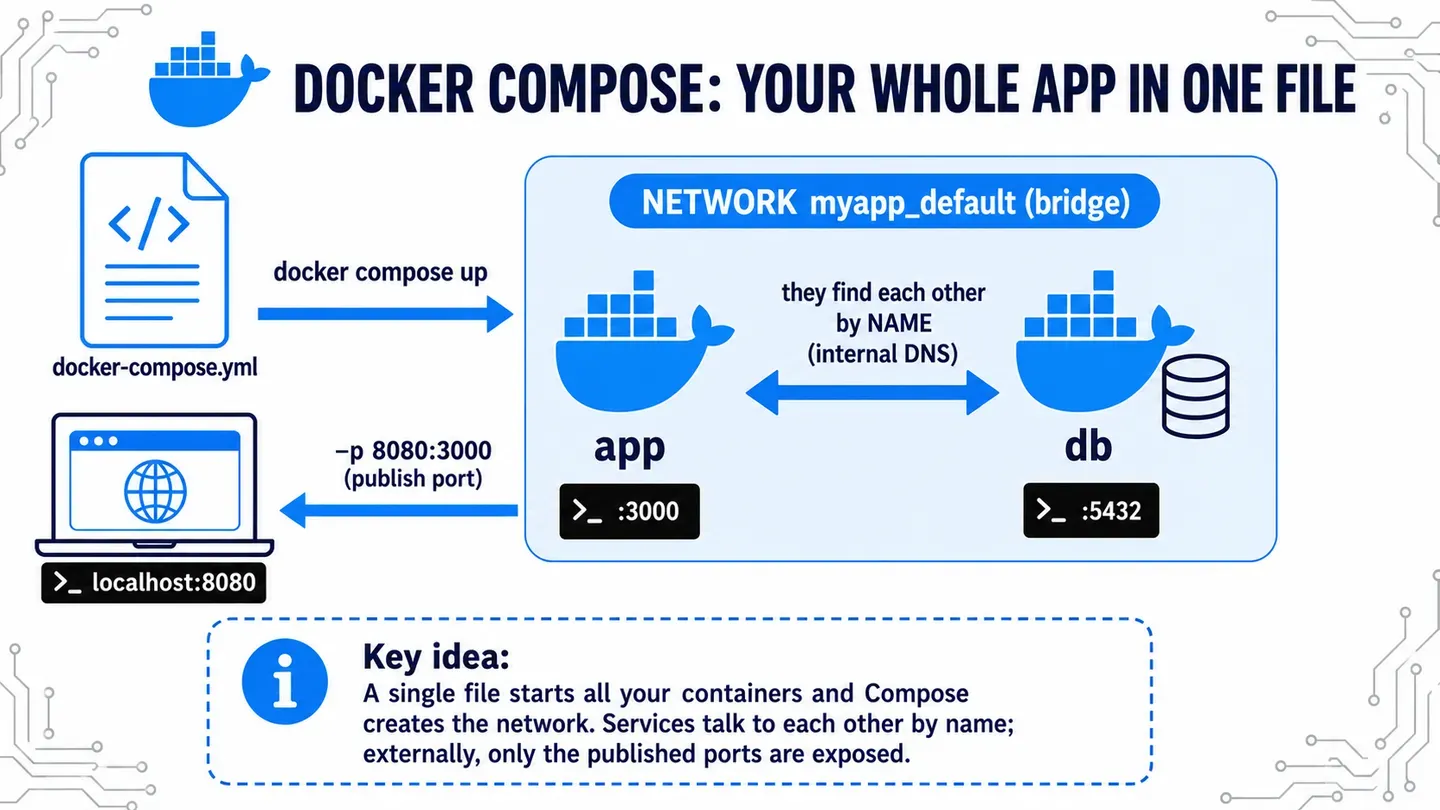
⚠️ Compose automatically creates a project-specific bridge network (<project>_default) and connects every service to it. That’s why they find each other by service name (DNS) — exactly the network you had to set up by hand in the networking pill.
Example
An app and its database, each in its own container:
# docker-compose.yml
services:
  app:
    image: my-app:1.0
    ports:
      - "8080:3000"
    environment:
      DATABASE_URL: postgres://db:5432/mydb   # 'db' = service name
    depends_on:
      - db

  db:
    image: postgres:16
    environment:
      POSTGRES_PASSWORD: secret
The app connects to the database by writing db as if it were its address. It doesn’t need to know its IP: Compose put both containers on the same network, and there db resolves on its own. Before, you ran two docker run commands and created the network by hand; now it’s one file and a single docker compose up.
Basic commands
docker compose up -d      # build and start everything in the background
docker compose ps         # see the services and their status
docker compose logs -f    # follow the logs of all services
docker compose down       # stop and remove containers and network